Items and flying objects
The dungeon view · Spots and wall decorations · On the floor and in the air
In brief
Items on the floor are drawn at their spot, reduced by one scale step per row of distance and spread a little by their item number; those three steps ahead on the far spots, and the near spots of the party's row, are not drawn. Flying objects are drawn at a fixed height, with a shape that depends on what flies and on its direction compared with the party's facing.
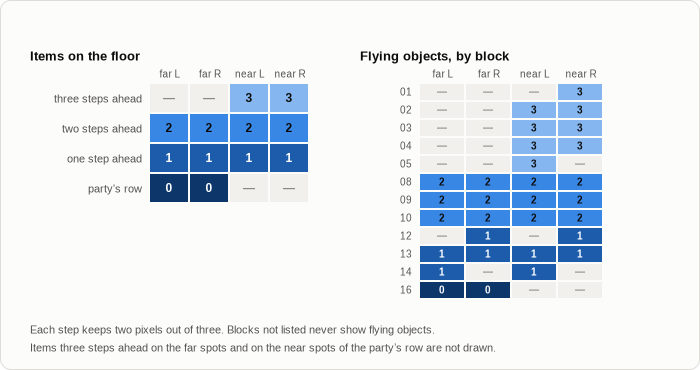
Items on the floor
Items are drawn only if the front face of their block, the side turned
towards the party, has no wall graphics or carries
WALL_RUNTIME_SHOW_BLOCK_OBJECTS; the party's own block is always drawn.
Items lying at positions 4 to 7 are not drawn here; an item at position 8 is
in a wall niche.
for each item of the block:
    if niche (position 8):  spot = far left (for the scale only); x = niche_x[block]; y = niche_y[depth]
    else:                   spot = spot of the position; x = 88 + spot_x; y = 124 + spot_y
    steps = item_scale[depth][spot]                  # −1: not drawn
    if the front face is a door (WALL_RUNTIME_DOOR) and spot is far and steps != 0:
        clip to the bounds of another visible block (see below); y −= 4
    shape = item shape reduced `steps` times
    x = x − 4 × width + 2 × jitter[item & 7]
    y = y − height + (0 if niche else jitter[(item >> 1) & 7])
    draw shape at (x, y)
| Depth | Far spots | Near spots | Niche y |
|---|---|---|---|
| three steps ahead | not drawn | 3 steps | 37 (not drawn) |
| two steps ahead | 2 steps | 2 steps | 49 |
| one step ahead | 1 step | 1 step | 56 |
| party's row | full size | not drawn | 0 |
jitter= 0, −2, 1, −1, 2, 0, 1, −1: items in the same spot are spread according to their item number.niche_xby block, 00 to 17: −56, −8, 40, 88, 136, 184, 232, −72, 8, 88, 168, 248, −40, 88, 216, −88, 88, 264.- The block whose bounds are used for items behind a door is 03 for block 09, 09 for 13, 11 for 15, 12 for 16 and 13 for 17; the other blocks use no extra clipping.
Flying objects
A flying object is drawn at x = 88 + spot x of its spot and at a fixed y = 39, with these scale steps (— not drawn, blocks not listed: never):
| Block | Far left | Far right | Near left | Near right |
|---|---|---|---|---|
| 01 | — | — | — | 3 |
| 02 | — | — | 3 | 3 |
| 03 | — | — | 3 | 3 |
| 04 | — | — | 3 | 3 |
| 05 | — | — | 3 | — |
| 08 | 2 | 2 | 2 | 2 |
| 09 | 2 | 2 | 2 | 2 |
| 10 | 2 | 2 | 2 | 2 |
| 12 | — | 1 | — | 1 |
| 13 | 1 | 1 | 1 | 1 |
| 14 | 1 | — | 1 | — |
| 16 | 0 | 0 | — | — |
Like items, flying objects are hidden by a front face with wall graphics
unless it carries WALL_RUNTIME_SHOW_BLOCK_OBJECTS. Up to five are drawn
per block, one per spot. The shape depends on what flies and on its
direction of flight compared with the party's facing:
if the object is a thrown item:
    s = item shape of its icon                       # as for items on the floor
    k = 0 if it flies the way the party faces, 1 if towards the party, else none
    if k != none and flight_shape[s] != none:
        shape = thrown shape [flight_shape[s] + k];  mirrored = flight_mirror[direction][position]
    else:
        shape = item shape s;  mirrored = (direction == the party's right)
else:                                                # any other flying object
    shape = thrown shape [object type];  mirrored = flight_mirror[direction][position]
    if the object is marked centred: x = 88 + centre spot x;  y = 44
shape = shape reduced `steps` times
x = x − 4 × width;  y = y − height  (y − height / 2 for a centred object)
draw shape at (x, y), mirrored or not
The 13 thrown shapes are cut from THROWN.CPS when the game starts: nine of
32 × 24 pixels, then four of 48 × 32. Only three item shapes have a flight
shape, 15, 18 and 20, which use the thrown shapes 2–3, 4–5 and 6–7, the first
of each pair when the item flies away from the party. Indexed by direction
of flight, then by position in the block, flight_mirror is:
| Direction of flight | North-west | North-east | South-west | South-east |
|---|---|---|---|---|
| North | no | yes | no | yes |
| East | no | no | yes | yes |
| South | yes | no | yes | no |
| West | yes | yes | no | no |
Sources
Locations refer to the game executable reference;
comparative sources are listed in the technical references.
The figures are drawn from the values listed on these pages, with no game
graphics, by make_view_figures.py.